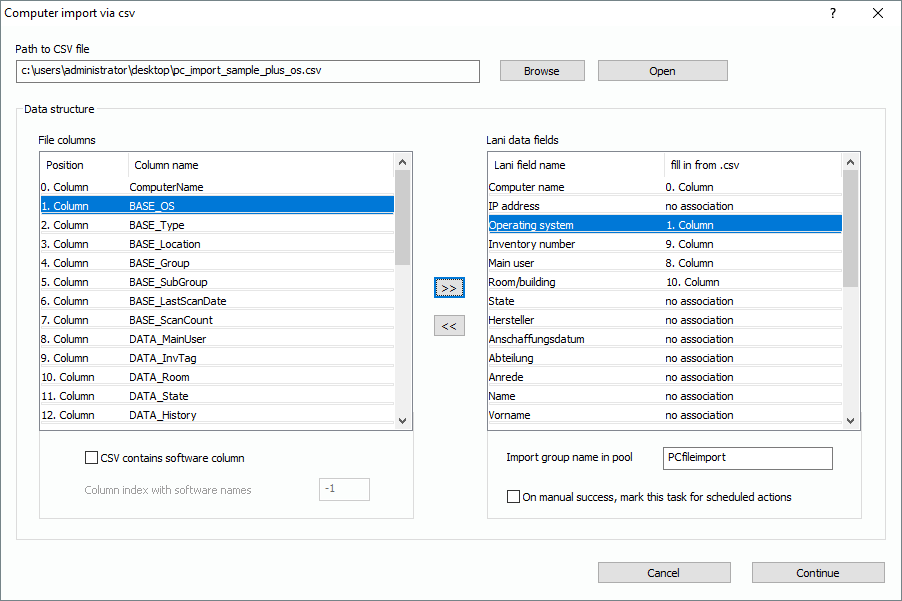
The names for operating systems underlie a standard in the Lan-Inspector, so it maybe that the names of operating systems in the csv won’t match the standards and will therefore not be recognized. Instead of “Microsoft Windows 8.1 Professional“, you might have “MS Windows 8.1 pro“ in your file. In the picture you see that the field “Operating System“ has an association now.
If you click on “Continue”, the import process starts, trying to recognize the operating systems from the csv. On success, the field in the computer record will contain the proper OS and the object receives the correct icon for that OS.
If you have names of operating systems in your csv file that differ from the standard, the process creates a computer object with an “Unknown Operating System”. The import example from the installer package “pc_import_sample_plus_OS.csv“ is supposed to demonstrate this procedure. It contains names of operating systems that differ from the standard. If you scan the PCs later on, the operating system will be corrected automatically.