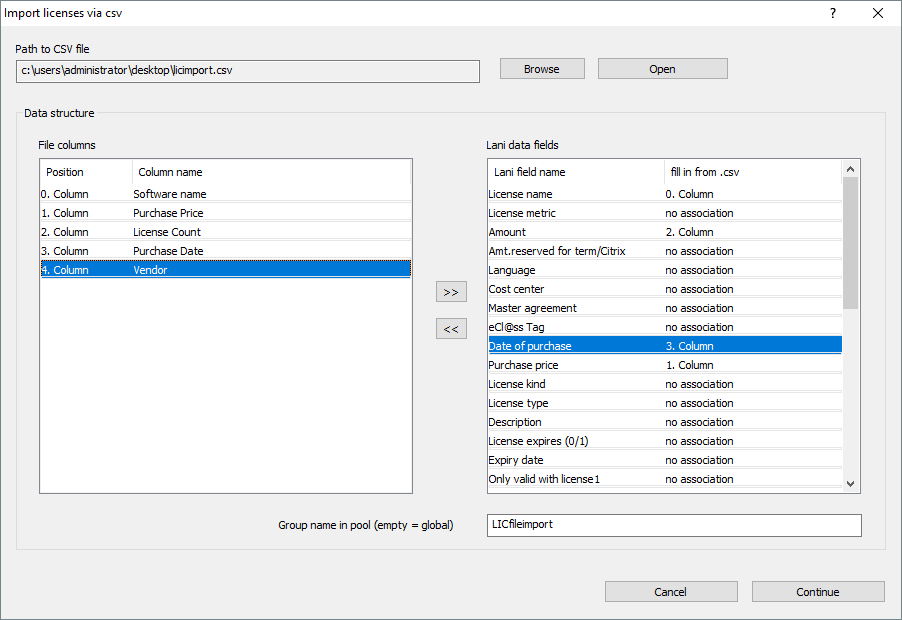
You can import license records from a csv file (“Menu: Lizcense+Software Management/More/Import Licenses via Csv“). Please keep in mind that software names may have to be adjusted to Lan-Inspector naming conventions. If you want to create license balances, the names of your license records have to match the software names in the network.
After you start the import function, the import manager for import processes appears. Here, as well as in other import processes, you can create and maintain import configurations. You can re-use them later on if you have to repeat an import process.
Click on “Edit / Execute >>“ to open the interface where you can specify the path to the CSV file and set the associated columns. You can set associations for all fields available in a record set of a license.
Successfully imported license records will appear in the license pool in the group which name you can specify at the bottom of the interface window. If you leave this field empty, all imported licenses will be set to the “Global” branch.