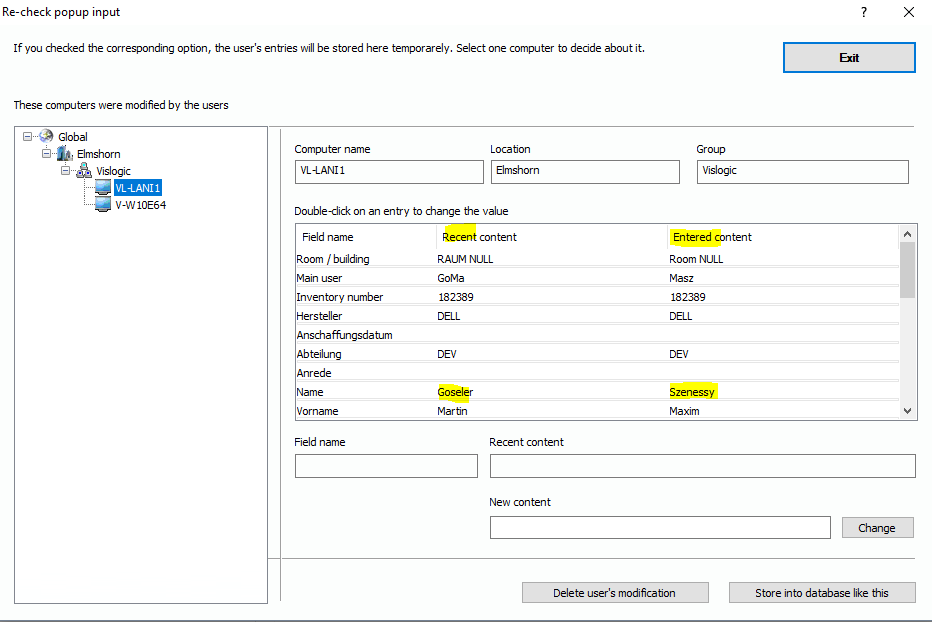
If you have configured “User entries have to be re-checked by the admin …“ in the popup configuration, the system doesn’t write the data directly into the data base. It stores the entered data in a cache where the administrator can check the entries if they are plausible / correct. In the function tree, choose “Inventory Management/More/Re-check Popup Input”. The following dialog appears:
On the left side, you see the location tree which lists all computers with cached user entries. Click on one computer object. On the right side, you will see the object’s content of the data base and next to it, you see the entries the users have made.
To edit a user entry, just double-click on the
corresponding line. The content will appear in the fields below where you can
edit them. Click on “Change” to save your changes.
At the end of the process, you have the choice between discarding the cached entries or writing them to the data base. Just click on the associated button.