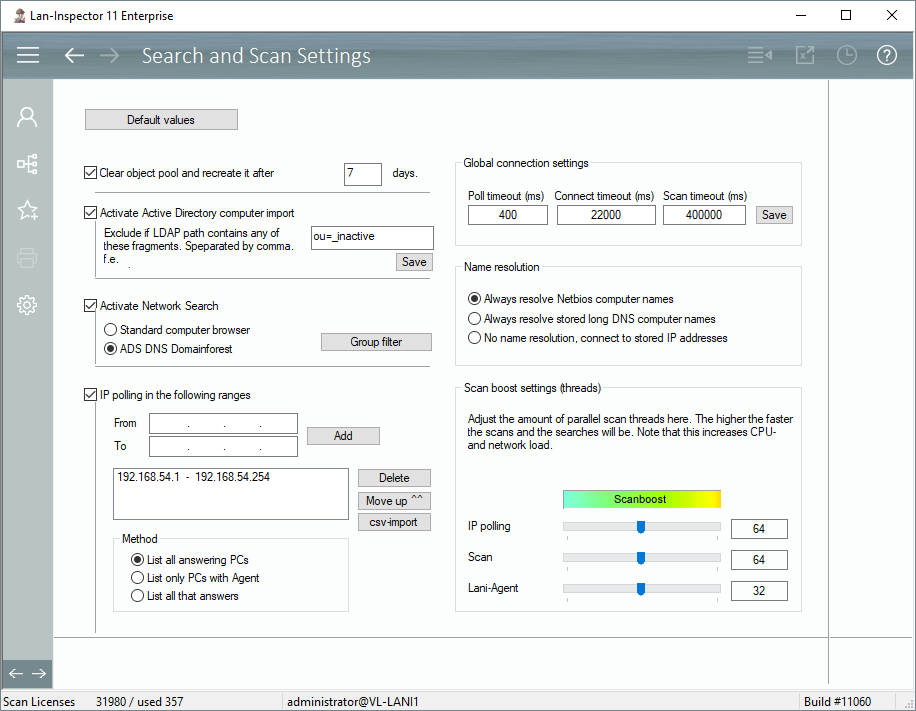
An important part of collecting the inventory of individual computers in your network is to know what computers exist. The Lan-Inspector features a variety of methods to find computers in the network. You can select one or all of them:
A) Direct import of objects from Active Directory Service
B) Computer browser search (Windows 7 and lower)
C) IP polling in specified ranges
All computers found in one of these ways will be collected in the pool of unassociated computers, see 6.3.1 Location Tree and Network Search or “Inventory Management/Location tree and Network Search”. You can decide if the Lan-Inspector fills the pool incrementally without expiry, of if you want to erase it at specified intervals in order to build it up with newly found computers. This can avoid hosting very old computers that possibly don’t exist anymore.