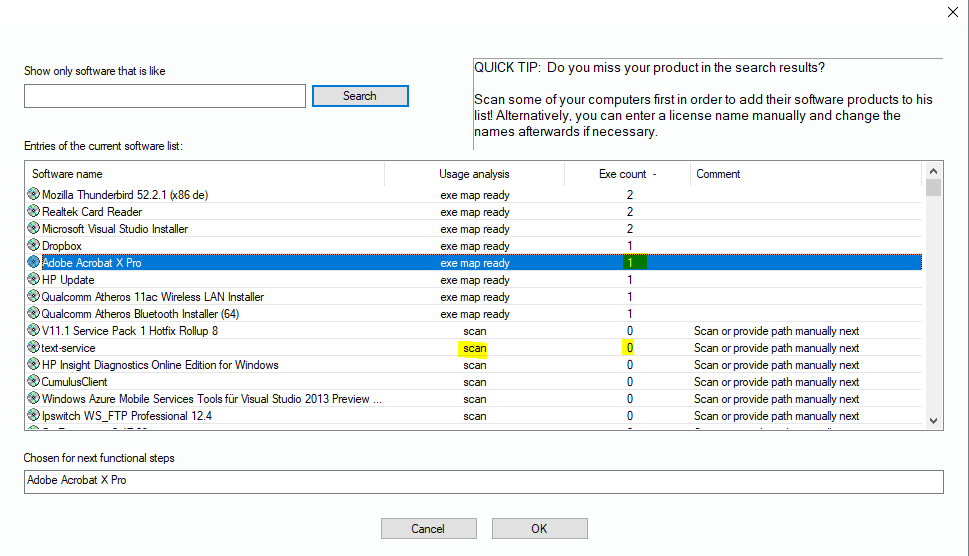
In the moment the Lan-Inspector scans the PCs to
collect their software installations, it also takes a snapshot of all exe
components belonging to these products. To achieve this, the option for this
spider scan has to be activated, see 6.9.1 Scan Configuration, option „Collect product
EXEcutables“.
If the Lan-Inspector has information about product components, they will be tagged with “exe map ready” in the product catalogue. If there are no files, it maybe possible that the corresponding PCs have to be scanned first. Exotic installers may install in a way that will prevent the scan for exe files. In that case you have the option to scan an installation folder (see “Scan installation folder”).
If you selected a product with an existing exe map, click on ”OK“. The exe configuration window will create a tab dialog for each component.
Please note that every registered exe file has to be processed. It is recommended to have an eye on the choice of exe files. Only register the main exe files of a product. If you’re not sure about the importance of an exe file, just delete it. Select the corresponding tab dialog associated with the exe file and click on “Delete EXE “.
If you choose a product that has no exe map, the Lan-Inspector will seek for PCs that are currently online and have the product installed. You can then ask for a scan of that PC in order to get the exe map this time.